|
|
| Statistics |
Total online: 1 Guests: 1 Users: 0 |
|
|
|
How to Capture the Screen or a desired window.
How to Capture the Screen or a desired window.
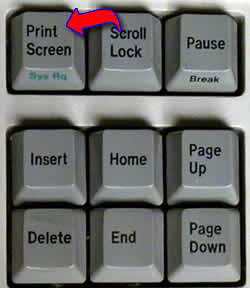
Capturing Screen and/or Print screen is a very useful
for computer users. so, i now i am going to tell you haow to do this
with easy steps..
Capture a screen shot of your desktop use the following steps -
- Hit "Print Screen" key on your keyboard (or "Print Scrn", or similar is on the right hand side of your keyboard),
- Open Photoshop, Paintshop, Paint or similar photo editor,
- Paste the image and save the file as Jpeg, Bitmap format etc..
Capture a screen shot of only a window, a pop-up, or an error dialog use the following steps-
- Make sure the window or popup is active on the very front of your screen (which you want to capture)
- Press and Hold the "Alt" button and press "Print Screen"("Print Scrn" or similar) key together.
- Open Photoshop, Paintshop, Paint or similar photo editor,
- Paste the image and save the file as Jpeg, Bitmap format etc..
- By Viraj Kansara.
|
| Category: Computer | Added by: vkworld (2008-07-28)
|
| Views: 455
| Rating: 0.0/0 |
|
|
|